










Motion Boom Plus|Outdoor Speake
soundcore's Ultra-portable Outdoor Speaker
Color:

- Incredible Sound Loved by 20 Million+ People
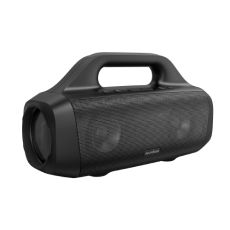
- Epic Outdoor Sound: 80W booming sound is delivered by two 30W woofers and 10W tweeters, while real-time intensified bass can be heard with Soundcore's proprietary BassUp technology. To improve treble performance of Motion Boom Plus outdoor speaker, titanium drivers ensure an all-around epic sound.
- Lightweight and Ultra-Portable: Take your tunes everywhere you go with Motion Boom Plus Bluetooth speaker's built-in handle and detachable strap.
- 20-Hour Playtime: Motion Boom Plus outdoor speaker is equipped with a 13,400mAh battery capacity with 20 hours of playtime to save you the trouble of frequent charging and make listening more enjoyable.
- Water and Dust Resistant: With an IP67 certification, you'll never have to worry about water splashes, rain, accidental spills, or dust while you're out and about with your Motion Boom Plus outdoor speaker.
- Note : For peak performance, please use the soundcore app and update to the latest firmware.
Services and benefits
Want More Perks?
1. Priority Shipping2. Member Pricing on Selected Products 3. Birthday Gift4. Unlock Benefits with soundcoreCredits Learn More
30 Days Price Match
Payment Method
Delivery Method

Motion Boom Plus|Outdoor Speake
Coming Soon
FAQ
App
1. Connect your device to Motion Boom Plus.
2. Open the soundcore app.
3. Press "..." in the top right corner to access more options.
4. Turn off voice prompts.
2. Open the soundcore app.
3. Press "..." in the top right corner to access more options.
4. Turn off voice prompts.
1. Open the soundcore app and press 'Update Firmware'.
2. Do not use your phone while the firmware is updating, except if you’ve set the soundcore app to run in the background.
3. Motion Boom Plus will restart automatically after upgrading.
2. Do not use your phone while the firmware is updating, except if you’ve set the soundcore app to run in the background.
3. Motion Boom Plus will restart automatically after upgrading.
Operation&Features
Turn on the speaker, then hold the Bluetooth and Volume + buttons for 5-8s.
If you haven't charged or used Motion Boom Plus in a long time, the battery may be over-discharged. Charge for at least one hour before turning it on.
No, Motion Boom Plus can float on the surface of the water.
1. Turn on 2 Motion Boom Plus speakers and connect either one to your device via Bluetooth.
2. Hold the Bluetooth button for 2-3s on both speakers until they flash white.
3. Wait for 3-5s until you hear 'ding' sound. This means they are successfully paired.
4. Once paired, the primary speaker will show a solid blue light, while the secondary speaker will show white light.
2. Hold the Bluetooth button for 2-3s on both speakers until they flash white.
3. Wait for 3-5s until you hear 'ding' sound. This means they are successfully paired.
4. Once paired, the primary speaker will show a solid blue light, while the secondary speaker will show white light.
Yes.
1. Turn on 2 Motion Boom Plus speakers and connect one to your device via Bluetooth.
2. Press the PartyCast button on both speakers and you will see a solid white light.
3. Wait for 3-5s until you hear a 'ding' sound. This means they are successfully paired.
4. Once paired, the primary speaker will show solid white light, while the secondary speaker will show white light.
2. Press the PartyCast button on both speakers and you will see a solid white light.
3. Wait for 3-5s until you hear a 'ding' sound. This means they are successfully paired.
4. Once paired, the primary speaker will show solid white light, while the secondary speaker will show white light.
Charging
- Solid red light while charging.
- Solid white light when fully charged.
- Solid white light when fully charged.
Yes. There is a USB-A port for charging other devices.
You can use a USB-C wall charger with 5V/3A output to recharge.
By using a 5V/3A USB-C wall charger, you can recharge to 100% in 5.5 hours.
To fix the charging issue, you can try the following steps:
1. Wipe clean the tip of the charging cable.
2. Try using a different cable or wall charger (5V/3A output) to recharge the speaker.
3. Reset the speaker.
4. Recharge for at least half an hour to prevent over-discharge.
1. Wipe clean the tip of the charging cable.
2. Try using a different cable or wall charger (5V/3A output) to recharge the speaker.
3. Reset the speaker.
4. Recharge for at least half an hour to prevent over-discharge.
It means the battery is low.
Bluetooth Connection
1. Confirm that the speaker is fully charged and not paired with other devices.
2. Forget all Bluetooth pairing records on your device.
3. Reboot your speaker and your device.
4. Disable and enable Bluetooth on your device.
5. Reset the speaker.
6. Try to connect the speaker to another device.
2. Forget all Bluetooth pairing records on your device.
3. Reboot your speaker and your device.
4. Disable and enable Bluetooth on your device.
5. Reset the speaker.
6. Try to connect the speaker to another device.
A PIN or password is not needed when pairing a soundcore speaker with a device. Hence, if you encounter an issue during the pairing process, please try these steps:
1. Confirm that soundcore Motion Boom Plus is fully charged and not connected to other devices.
2. Forget all Bluetooth pairing records on your device.
3. Reboot your soundcore Motion Boom Plus and your device.
4. Disable and then enable Bluetooth on your device.
5. Reset soundcore Motion Boom Plus by holding the Bluetooth and Volume+ buttons at the same time for 5-10s until Motion Boom Plus restarts.
6. Connect soundcore Motion Boom Plus to a different device.
1. Confirm that soundcore Motion Boom Plus is fully charged and not connected to other devices.
2. Forget all Bluetooth pairing records on your device.
3. Reboot your soundcore Motion Boom Plus and your device.
4. Disable and then enable Bluetooth on your device.
5. Reset soundcore Motion Boom Plus by holding the Bluetooth and Volume+ buttons at the same time for 5-10s until Motion Boom Plus restarts.
6. Connect soundcore Motion Boom Plus to a different device.
Sound
1. Confirm that the speaker is fully charged.
2. Reset the speaker.
3. Reboot your speaker and your device.
4. Try connecting the speaker to another device. If possible, try using another app or audio source.
5. Ensure there are no physical objects interfering with the Bluetooth connection from the speaker to the device, such as a doorway or wall.
1. Confirm that the speaker is fully charged.
2. Reset the speaker.
3. Restart your speaker and the device it is paired with to test again.
4. Try connecting the speaker to a different device. If possible, try another app or audio source.
5. Make sure the volume on both the speaker and the paired device are turned up.
2. Reset the speaker.
3. Restart your speaker and the device it is paired with to test again.
4. Try connecting the speaker to a different device. If possible, try another app or audio source.
5. Make sure the volume on both the speaker and the paired device are turned up.
Double press the PartyCast button on soundcore Motion Boom Plus.
1. Connect your device to Motion Boom Plus.
2. Open the soundcore app.
3. Press "..." in the top right corner to access more options.
4. Turn off voice prompts.
2. Open the soundcore app.
3. Press "..." in the top right corner to access more options.
4. Turn off voice prompts.
1. Open the soundcore app and press 'Update Firmware'.
2. Do not use your phone while the firmware is updating, except if you’ve set the soundcore app to run in the background.
3. Motion Boom Plus will restart automatically after upgrading.
2. Do not use your phone while the firmware is updating, except if you’ve set the soundcore app to run in the background.
3. Motion Boom Plus will restart automatically after upgrading.
Specs
| Output | 80W |
| Playtime | 20 Hours |
| Sound | Powerful Deeper Bass Sound |
| Water Resistance | Waterproof & Dustproof (IP67) |
| Multi-Speaker | TWS PartyCast 2.0 |
| Recommended For | Boat Beach Camping Picnic |
| Bluetooth Version | 5.3 |


