







Bluetooth Speakers for iPhones: How to Pick, Pair, and Play
Your iPhone sounds great through earbuds, but it fills a room only with the right speaker. The catch is that Apple reserves AirPlay for Wi-Fi devices, so most portable speakers rely on Bluetooth instead. That is no drawback. The best Bluetooth speakers for iPhones pair in seconds, stream reliably, and deliver bigger, richer sound than any phone can manage alone.
This guide explains what to look for, how to connect, and which soundcore speakers suit iPhone users best.

Key Takeaways
- soundcore Bluetooth speakers pair directly with iPhones for audio playback, without cables or requiring the soundcore app for basic listening.
- Pairing takes seconds: open Settings, tap Bluetooth, and select the speaker.
- AirPlay needs Wi-Fi, while Bluetooth is simpler and works anywhere, which suits portable speakers.
- Check battery life, IP rating, and app features before you buy.
What to Look for in a Bluetooth Speaker for iPhone
Four things separate a decent speaker from the right one.
AirPlay vs Bluetooth Connectivity
First, understand how your iPhone sends audio.
iPhones can stream audio to speakers through Bluetooth or AirPlay. Bluetooth is a universal wireless standard that connects directly to your phone, while AirPlay uses Wi-Fi to stream audio to compatible Apple devices, including multi-room setups.
Bluetooth is often the more practical choice for portable listening because it does not depend on a Wi-Fi network. It pairs quickly, works on the move, and lets you enjoy audio wherever you take your speaker.
Battery Life and Portability
Next, match the size and stamina to how you will use it.
Battery life varies by model, volume level, audio content, and enabled features. Higher volume and extra features such as lighting or enhanced bass modes can reduce playback time. Weight then decides where a speaker fits into your day.
- For longer trips, consider a speaker with extended battery life, such as 20 hours or more of playback.
- A built-in power bank tops up your iPhone when you are away from a socket.
- Lighter speakers travel easily, while larger ones trade portability for louder, fuller sound.
Water and Dust Resistance Ratings
If your speaker leaves the house, durability matters.
Waterproofing is graded by an IP (Ingress Protection) code, set by the international standard IEC 60529. The two digits tell you exactly what a speaker can survive.
- First digit (0 to 6): protection against solids and dust. Six means fully dust-tight.
- Second digit (0 to 9): protection against water. Seven means immersion up to 1 metre.
- An "X", as in IPX7, means that test was not carried out, not that protection is zero.
For outdoor activities such as poolside listening or beach trips, a higher water-resistance rating can provide extra protection. The right rating depends on where and how you plan to use your speaker.
iOS Companion Apps and Siri Support
Finally, software adds control your iPhone alone cannot.
The free soundcore app, available on the App Store, unlocks a custom equaliser, EQ presets, and firmware updates. Once a speaker is paired over Bluetooth, Siri controls whatever your iPhone is playing, so you can skip tracks or change the volume hands-free. Together, app tuning and Siri control make everyday listening effortless.
How Do You Connect a Bluetooth Speaker to an iPhone?
Pairing is quick once you know the steps. You can connect a Bluetooth speaker to an iPhone in under a minute.
Step-by-Step Pairing Guide
New to this? Here is how to pair a Bluetooth speaker with an iPhone.
- Turn on your speaker and put it in pairing mode by holding the Bluetooth button until the indicator flashes.
- On your iPhone, open Settings, then tap Bluetooth.
- Make sure Bluetooth is switched on.
- Under Other Devices, tap your speaker’s name.
- Wait for it to move to My Devices, marked "Connected".
- Play any track to test the sound.
Troubleshooting Common Connection Issues
If the connection drops or will not pair, try these fixes.
- Move the speaker and iPhone closer together, as walls and distance weaken Bluetooth.
- Turn Bluetooth off and on again in Settings.
- Forget the speaker in Settings, then pair it again.
- Restart both the speaker and the iPhone.
- Update the speaker’s firmware in the soundcore app.
- If your speaker supports multi-device pairing, check that it is connected to the correct device.
Do You Need AirPlay or Is Bluetooth Enough?
For most iPhone owners, the answer is simple.
AirPlay suits fixed, Wi-Fi-connected home systems and multi-room setups. For portable speakers you carry to the garden, the park, or the beach, Bluetooth is not just enough; it is better. It pairs in seconds, needs no network, and keeps playing wherever you go.
Every speaker in our range of Bluetooth speakers is built around that convenience, pairing straight to your iPhone with no setup. So unless you specifically want whole-home Wi-Fi audio, a Bluetooth speaker is the more practical choice for most iPhone users.
Recommended Bluetooth Speakers for iPhone Users
Ready to choose? These two soundcore speakers stand out for iPhone listeners. Here is how they compare.
|
Model |
Output |
Battery |
Water resistance |
Connectivity |
Best for |
|
soundcore Rave 3S |
200W |
Up to 12h |
IPX4 |
Bluetooth, Auracast + TWS |
Parties, karaoke, home entertainment |
|
soundcore Boom 2 Plus |
Up to 140W |
Up to 20h |
IPX7 |
Bluetooth 5.3, PartyCast 2.0 |
Outdoor sound and deep bass |
soundcore Rave 3S – Powerful Bluetooth Speaker for Party and Home Entertainment
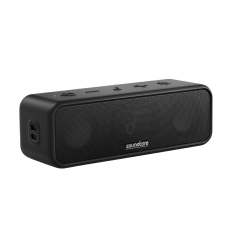
The soundcore Rave 3S delivers 200W of powerful sound through a 6.5-inch woofer and three 2.5-inch full-range drivers, with output reaching up to 108 dB. Connect it to your iPhone via Bluetooth, select your favourite track, and use AI Vocal Removal to reduce original vocals in real time for karaoke-style performances, supported by two wireless microphones and a beat-synced light show.
- Output: 200W, up to 108 dB, with BassUp
- Drivers: 6.5" woofer plus three 2.5" full-range drivers
- Battery: up to 12 hours
- Durability: IPX4 splash resistance
- Connectivity: Bluetooth, Auracast, and TWS pairing
- Extras: dual wireless microphones, AI Vocal Removal, app EQ and lighting control
It is designed for house parties, karaoke nights, and home entertainment.

soundcore Boom 2 Plus – Portable Bass Speaker for Music and Outdoor Use
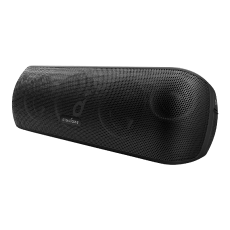
The soundcore Boom 2 Plus delivers up to 140W of output through dual 50W woofers and dual 20W tweeters, with sound levels reaching up to 103 dB. BassUp 2.0 boosts output from 100W to 140W for enhanced bass performance, while its IPX7 waterproof design and floatable build make it suitable for outdoor listening. Connect it to your iPhone via Bluetooth 5.3 and enjoy up to 20 hours of playback.
- Output: up to 140W (100W standard), 103 dB, with BassUp 2.0
- Audio: 2+2 setup, dual 50W woofers and dual 20W tweeters
- Battery: up to 20 hours, with a 10W power bank
- Durability: IPX7 waterproof and floatable
- Connectivity: Bluetooth 5.3, PartyCast 2.0 for 100+ speakers
- Charging: 30W fast charging, full in about 3 hours
It is designed for outdoor gatherings and listeners who enjoy deeper bass.

Conclusion
Choosing the best Bluetooth speaker for iPhone depends on how you listen. The soundcore Rave 3S is built for parties, karaoke, and home entertainment, while the Boom 2 Plus delivers powerful bass and portable performance for outdoor use.
Whichever model you choose, connecting an iPhone to a Bluetooth speaker takes only a few steps. Explore soundcore Bluetooth speakers to compare portable, outdoor, and party options and find the right match for your listening needs.
FAQs
Do Bluetooth speakers work with iPhones?
Yes. Every Bluetooth speaker works with an iPhone. Apple builds Bluetooth into every model, so you simply open Settings, tap Bluetooth, and select your speaker to pair. Once connected, the speaker plays audio from any app, including music, videos, podcasts, and calls, with no extra apps or cables needed.
Which is better, a wireless or Bluetooth speaker?
Bluetooth is one type of wireless connection, alongside Wi-Fi options like AirPlay. Bluetooth speakers are simpler and more portable, pairing directly with your iPhone anywhere. Wi-Fi speakers can offer higher-resolution streaming and multi-room audio at home. For everyday and outdoor use, a Bluetooth speaker is usually the more practical choice.
Does Bluetooth destroy sound quality?
No, though it does compress audio slightly. Modern Bluetooth handles music well, and most listeners notice no difference in normal use. A well-engineered speaker, tuned drivers, and a stable connection matter far more to sound quality than Bluetooth itself. For casual and outdoor listening, the quality is excellent.


