







How to Choose and Connect a Bluetooth Speaker for a Projector
After a long day, there is nothing better than settling down for a film night at home or enjoying a garden screening with friends. While projectors create a bigger, more immersive picture, their built-in speakers are often designed for convenience and may not provide the volume, bass, and dialogue clarity needed for a more immersive cinema experience.
Adding a Bluetooth speaker to a projector is a simple way to upgrade your setup with richer, more powerful sound. This guide explains what to look for, how to connect your speaker wirelessly or with a cable, and which soundcore speakers are ideal for different viewing spaces.

Can You Connect a Bluetooth Speaker to a Projector?
Yes. Many projectors can connect to a Bluetooth speaker in just a few steps, depending on the projector model and available connection options. Many modern projectors, especially smart and portable models, include built-in Bluetooth for direct pairing. For projectors without it, a Bluetooth transmitter plugged into the audio output adds wireless sound just as easily.
The result can be a noticeable improvement over built-in projector audio, with clearer dialogue, stronger bass and a more immersive listening experience.
Key Factors to Consider When Choosing a Bluetooth Speaker for a Projector
Choosing the right Bluetooth speaker for a projector depends on more than just volume. Connection reliability, audio timing, room size and portability all play a role in creating a better viewing experience.
Here are the key factors to consider before choosing a speaker for your setup.
Audio Latency and Bluetooth Version
Start with latency — the small delay between the picture appearing on screen and the sound reaching your ears.
Bluetooth connections can introduce a slight delay, which may cause dialogue to feel out of sync with the video. The level of delay depends on the Bluetooth version, codec support and the devices being connected. A few features can help keep your audio and visuals better aligned:
- Newer Bluetooth versions, such as Bluetooth 5.3, can offer connectivity improvements, although real-world performance also depends on the projector, speaker and surrounding environment.
- Many projectors include audio-sync or delay settings to help fine-tune sound timing.
- For the lowest possible latency, a wired connection such as a 3.5mm aux cable is a reliable option.
Power Output and Room Size
Next, match the power to your space.
- Small rooms and bedrooms: A compact speaker may be suitable for personal viewing and casual film nights.
- Living rooms and medium-sized spaces: A speaker with stronger output can help deliver fuller sound and clearer dialogue.
- Large rooms and garden screenings: Higher output can help sound travel further while maintaining clarity.
- Rather than choosing based on wattage alone, consider the room size, speaker placement and the type of content you usually watch. Films with dialogue-heavy scenes may benefit more from clear vocal performance, while action films and music may require stronger bass response.
Connectivity Backup Options
A flexible connection setup can make it easier to pair a projector with a Bluetooth speaker, especially when different devices offer different connection methods.
Consider speakers that include multiple connection options, such as:
- A 3.5mm aux input gives you a wired backup.
- TWS pairing adds a second matching speaker for wider stereo sound.
- A Bluetooth transmitter covers projectors that lack native Bluetooth.
Flexible Bluetooth projector speakers give you more than one way to connect, so you are never stuck if a projector menu hides its Bluetooth option.
Portability and Battery Life
Finally, think about where and how long you will watch.
- Longer battery life is useful for outdoor screenings where power outlets may not be available.
- If you regularly move your projector setup, consider a speaker that balances battery life, size and portability.
- For outdoor use, a speaker with an appropriate water-resistance rating can provide added protection. Water and dust resistance ratings use the IP Code system, which shows the level of protection against different types of exposure.
How Do You Connect a Projector to a Bluetooth Speaker?
Here is how to connect a projector to a speaker via Bluetooth, step by step. Menu names vary slightly between projectors.
Method 1 — Native Bluetooth Pairing
If your projector has built-in Bluetooth, this is the quickest route.
- Power on the projector and open its Settings menu.
- Find Bluetooth, often under Sound or Network, and switch it on.
- Put your speaker in pairing mode by holding the Bluetooth button until it flashes.
- Select the speaker from the projector’s device list.
- Wait for "Connected", then play a video to check the sync.
Method 2 — Using a Bluetooth Transmitter Dongle
If your projector has no Bluetooth, a transmitter bridges the gap.
- Check the projector’s audio output, whether 3.5mm, RCA, or optical.
- Plug a Bluetooth transmitter into that output.
- Power the transmitter over USB or its own battery.
- Put the transmitter and your speaker in pairing mode to connect them.
- For video, choose a transmitter that supports a low-latency codec.
Connecting a Projector to Speakers via Wired Cable
Prefer the simplest, most reliable route? A cable is hard to beat.
- 3.5mm aux: connect the projector’s audio output to the speaker’s aux input.
- RCA or optical: use an adapter if your projector outputs these formats.
- HDMI ARC: some projectors send audio out over HDMI ARC to a compatible receiver, though many do not, so check your model first.
A wired connection avoids Bluetooth processing delays, making it a reliable option when audio synchronisation is important.
Bluetooth vs. Wired Connection — Which Is Better for Projector Audio?
Both work well, so the right choice depends on how you watch.
- Bluetooth: cable-free, flexible placement, and quick setup, with slight latency unless the projector offers audio sync.
- Wired: lower latency and a stable connection, although cable length may affect placement flexibility.
Pairing a projector and Bluetooth speaker gives you cinema sound without the clutter of a soundbar. For films where lip-sync matters most, a wired aux link wins. Explore our full range of Bluetooth speakers to find the right match for your setup.
Recommended Bluetooth Speakers for Projector Audio
These two soundcore speakers are suited to different projector setups, from outdoor screenings to indoor film nights.
|
Model |
Output |
Battery |
Wired aux-in |
Bluetooth |
Best for |
|
soundcore Boom 2 |
Up to 80W |
Up to 24h |
No |
Bluetooth 5.3 |
Bass and outdoor film nights |
|
soundcore Motion X600 |
50W |
Up to 12h |
Yes (3.5mm) |
Bluetooth 5.3 |
Indoor films and hi-res audio |
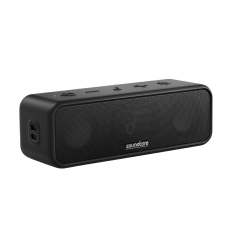
soundcore Boom 2 – Powerful Bass Bluetooth Speaker
The soundcore Boom 2 brings serious bass to film night. It delivers up to 80W through a 50W subwoofer and dual 15W tweeters, with BassUp 2.0 for extra punch during action scenes. An IPX7, floatable body and 24-hour battery make it ideal for garden screenings, and PartyCast 2.0 links 100+ speakers for a wider setup.
- Output: up to 80W (60W standard) with BassUp 2.0
- Battery: up to 24 hours, with a built-in power bank
- Durability: IPX7 waterproof and floatable
- Connectivity: Bluetooth 5.3, TWS and PartyCast 2.0
- Colours: black, blue, green
As the Boom 2 connects wirelessly, use your projector’s audio-sync setting to keep dialogue aligned during films.

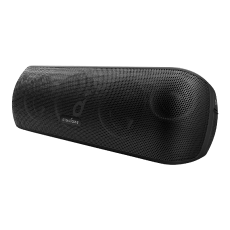
soundcore Motion X600 – Premium Portable Speaker
The soundcore Motion X600 is designed for detailed, high-fidelity sound, making it a strong option for indoor projector setups. Five drivers and five amplifiers deliver 50W of spatial audio, with an upward-firing driver that lifts sound around the room, plus Hi-Res and LDAC support. Crucially for projectors, it includes a 3.5mm aux input, so you can wire it directly for lag-free, perfectly synced film audio.
- Output: 50W spatial audio, with 5 drivers and 5 amplifiers
- Audio: Hi-Res, High Fidelity, and LDAC (LDAC on Android 8.0 and above)
- Battery: up to 12 hours
- Durability: IPX7 waterproof
- Connectivity: Bluetooth 5.3, 3.5mm aux-in, and TWS pairing
- Colours: Polar Gray, Lunar Blue, Aurora Green
The wired option makes it a strong choice for indoor film nights where audio synchronisation is important.

Troubleshooting Common Bluetooth Speaker and Projector Issues
If something is not working, these quick fixes usually solve it.
- No sound: set the projector’s audio output to Bluetooth or external, not its internal speakers.
- Will not pair: put the speaker in pairing mode and keep it close to the projector.
- Audio out of sync: use the projector’s audio-delay setting, or switch to a wired aux connection.
- Drop-outs: reduce distance and obstacles, then update the firmware in the soundcore app.
- Wrong device connects: forget old devices in the projector’s Bluetooth list, then reconnect.
Conclusion
Choosing the right Bluetooth speaker for a projector can transform your film nights, replacing limited built-in audio with clearer dialogue, richer bass, and more immersive sound.
For larger spaces and outdoor screenings, the soundcore Boom 2 delivers powerful bass and impressive volume. For indoor viewing where sound detail and flexible connectivity matter, the soundcore Motion X600 offers a high-fidelity listening experience with the option of a wired connection for improved audio synchronisation.
Whether you prefer the convenience of Bluetooth or the reliability of a cable, the right speaker setup can bring your projector experience closer to a home cinema experience.
FAQs
How to get better sound from a projector?
Built-in projector speakers are small and weak. To improve sound, connect an external Bluetooth speaker for richer, louder audio. Pair it wirelessly, or use a 3.5mm aux cable for zero latency. Position the speaker near the screen, adjust the projector’s audio-sync setting, and set a custom EQ in the soundcore app to suit films or music.
Can you use HDMI as audio output?
Sometimes. If your projector supports HDMI ARC, it can send audio out to a compatible receiver or soundbar over HDMI. Many projectors do not include ARC, though, so check your model’s specifications first. Where ARC is missing, use the 3.5mm aux output, an optical port, or Bluetooth to connect your speaker instead.
Do I need speakers to use a projector?
Not always. Many projectors have small built-in speakers, so they work on their own. However, that audio is usually quiet and lacks bass, which weakens films and music. Adding an external Bluetooth speaker gives you clearer dialogue, deeper bass, and higher volume, turning a basic setup into a proper home cinema.


