







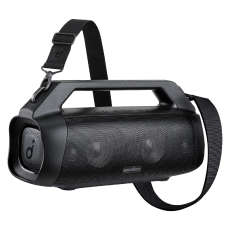
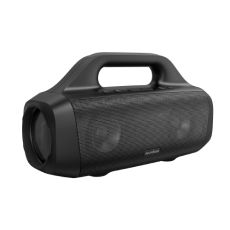


Motion X500 | Surround Sound Bluetooth Speaker
The World’s Most Portable Spatial Audio Speaker
Kolor:
- Immersive Spatial Audio:3 drivers deliver sound all around you, so you'll feel like your favorite artist is right there in front of you, every time you press play.
- 3X More Detail:Motion X500 features Wireless Hi-Res certified sound, which lets you hear your favorite songs as they were meant to be heard.
- 3 Fresh Finishes to Match Any Style:Get quality sound in a color you love with a choice of three finishes: Black Deluxe, Pink Punch, and Glitzy Blue.
- Great Sound, Portable Size:Motion X500 portable Bluetooth speaker lets you take immersive spatial audio with 3X more detail wherever you go.
- Fully Waterproof:With IPX7 protection, you can enjoy worry-free listening by the pool, at the beach, or even if it's raining.
Usługi i korzyści

Szybka wysyłka
Chcesz więcej korzyści?
1. Wysyłka priorytetowa2. Ceny dla członków na wybrane produkty3. Odblokuj korzyści dzięki soundcoreCredits Dowiedz się więcej
Metoda płatności
Motion X500 | Surround Sound Bluetooth Speaker
Wyprzedane
FAQ
General
Motion X500 Speaker
60 cm USB-C to C Cable
Safety Card&Quick Start Guide
Note: Wall charger not included
Motion X500 supports up to 12 hours of playtime.
Note: The 12-hour battery life is based on measurements taken at 50% volume and with
BassUpturned off. The actual battery life may vary depending on factors such as the type
of content being played, custom EQ settings, and volume level.
No, it cannot pair with the Motion+ / Motion X600 or other model speakers. However, the
Motion X500 can pair with another Motion X500 speaker via TWS.
Yes. The left side plays left channel, and the right side plays right channel.
Yes.
No.
Yes, you can deactivate the power on/off and Bluetooth connection sounds. Just connect
X500 to the soundcore app, and turnoff these sounds in the X500's setup interface.
Motion X500 is IPX7 waterproof,but before submerging it in water, it is necessary to
ensure that the waterproof cover on the back is securely fastened.
It takes around 5 hours to charge with a certified 5V/3A (15W) wall charger.
Turn on the speaker then hold down the Bluetooth and Volume + buttons for 5-10 seconds.
You'll hear a prompt, and the speaker will automatically restart.
40W.
Bluetooth 5.3.
Motion X500 supports LDAC, SBC, MPEG2, and AAC Bluetooth codecs.
Bluetooth Related
LDAC is a Bluetooth encoding format that can transmit 3 times the amount of data of the
ordinary SBC Bluetooth codec.
Note: LDAC only works on devices running Android 8.0 or above, it does not work
on iPhone.
On a device running Android 8.0 or above, do the following:
1. Open the soundcore app.
2. Go to Settings.
3. Click on Sound Mode.
4. Select Preferred Audio Quality and switch to LDAC codec.
Notes:
It takes about 10 seconds to switch audio codecs. You may be required to update the
speaker's firmware if available. Do not use the app or speaker while updating.
• LDAC provides higher quality sound but increases power consumption and reduces
playtime.
Enable LDAC in a low-interference environment to ensure a stable Bluetooth connection.
TWS stands for True Wireless Stereo, and it allows two identicial speakers to play stereo
sound after pairing up. Motion X500 supports TWS.
Method 1
1. Long press the power button to start both speakers.
2. Speaker 1: Hold the Bluetooth button until the button light flashes white.
3. Speaker 2: Hold the Bluetooth button until the button light flashes white.
4. Wait for a few seconds, and you will hear a sound when the two speakers have paired
successfully.
5. The master speaker is the one with the blue light.
6. Use the master speaker to pair with your device.
Method 2
1. Long press the power button to start both speakers.
2. Connect either speaker with your Bluetooth device.
3. On both speakers, press and hold the Bluetooth button for at least 2 seconds to enter
TWS pairing mode.
4. Wait for a few seconds, and you will hear a sound when the two speakers have paired
successfully.
When you have two Motion X500 speakers paired at the same time, the master speaker
supports left channel and sky channel (if spatial audio is turned on), while the secondary
speaker supports right channel and sky channel (if spatial audio is turned on).
MacBook:
1. Turn on Bluetooth and find soundcore Motion X500 in the list of available devices.
2. Connect soundcore Motion X500 to your MacBook.
3. Open "Sound" and confirm that soundcore Motion X500 is the default for all sound. If it
is not the default, change the settings.
Windows Laptops:
1. Turn on Bluetooth and find soundcore Motion X500' in the list of available devices.
2. Connect soundcore Motion X500 to your laptop.
3. Open ''Sound'' and confirm that soundcore Motion X500 is the default for all sound.
Sound Related
Hi-Res is an abbreviation for High Resolution Audio, which is an audio format with superior
sound quality that retains more audio detail.
Spatial audio places sound all around you to create an immersive listening experience.
Simply press the Spatial Audio button to turn on.
No.
Lighting effect related
The light at the top of the Motion X500 is called the Sky Light. It lights up while you're
listening to music via the sky channel upward-facing speaker on the top of Motion X500.
Yes, you can customize the color of the Sky Light through the soundcore app.
The following are the default skylight colors (Note: Light color can be customized in the
App),You can directly access different EQs through the EQ Switch Button.
White Light: Spatial Signature EQ
Cold White Light: Spatial Dynamic EQ
Warm White Light: Bass Boost EQ
Dokumenty i sterowniki
Motion X500 Speaker
60 cm USB-C to C Cable
Safety Card&Quick Start Guide
Note: Wall charger not included
Motion X500 supports up to 12 hours of playtime.
Note: The 12-hour battery life is based on measurements taken at 50% volume and with
BassUpturned off. The actual battery life may vary depending on factors such as the type
of content being played, custom EQ settings, and volume level.
No, it cannot pair with the Motion+ / Motion X600 or other model speakers. However, the
Motion X500 can pair with another Motion X500 speaker via TWS.
Yes. The left side plays left channel, and the right side plays right channel.
Yes.
No.
Yes, you can deactivate the power on/off and Bluetooth connection sounds. Just connect
X500 to the soundcore app, and turnoff these sounds in the X500's setup interface.
Motion X500 is IPX7 waterproof,but before submerging it in water, it is necessary to
ensure that the waterproof cover on the back is securely fastened.
It takes around 5 hours to charge with a certified 5V/3A (15W) wall charger.
Turn on the speaker then hold down the Bluetooth and Volume + buttons for 5-10 seconds.
You'll hear a prompt, and the speaker will automatically restart.
40W.
Bluetooth 5.3.
Motion X500 supports LDAC, SBC, MPEG2, and AAC Bluetooth codecs.


3D Aluminum Grille
The distinctive metal design has a rugged, industrial feel.

Comparison Table
 |  |  |  |  | |
soundcore Motion X500 | soundcore Motion X600 | soundcore Motion 300 | soundcore Boom 2 | soundcore Boom 2 Plue | |
| Customer Reviews | |||||
| Sound | Hi-Res,High Fidelity,LDAC | Hi-Res,High Fidelity,LDAC | Wireless Hi-res, Stereo Sound | Powerful Deeper Bass Sound | Ultra Deep Bass Sound |
| Output Power | 40W | 50W | 30W | 80W | 140W (100W Standard) |
| Water Resistance | IPX7 | IPX7 | IPX7 | IPX7 | IPX7 |
| Playtime | 12 Hours | 12 Hours | 13 Hours | 24 Hours | 20 Hours |
| Bluetooth Version | 5.3 | 5.3 | 5.3 | 5.3 | 5.3 |
Specyfikacje
| Output | 40W |
| Playtime | 12 Hours |
| Sound | Hi-Res,High Fidelity,LDAC |
| Water Resistance | Waterproof (IPX7) |
| Multi-Speaker | TWS |
| Recommended For | Indoor Bedroom Living Room |
| Bluetooth Version | 5.3 |
| Aux in | ✔️ |


