











40 €
de remise
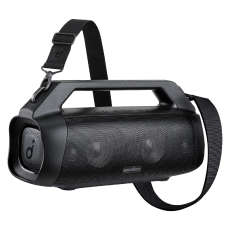
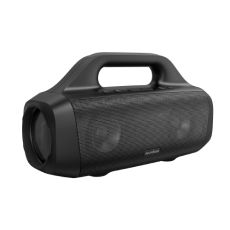
Boom 2 Plus | Une puissante enceinte Bluetooth avec basses pour l'extérieur
Faites l'expérience d'un son exceptionnel grâce à l'enceinte portable ultime.
Couleur
199,99 €
Vite ! Cette offre expire bientôt

40 € Réduction
Code: WS24RW1WDC

- 140W Max Booming Bass : Ressentez la puissance des basses dans chaque chanson grâce aux deux woofers pour plus de profondeur et de clarté. Avec BassUp️ 2.0, la puissance de sortie passe de 100 W à 140 W maximum, soit 160 % de plus que la première génération de BassUp.
- Clarté stéréo 2+2 : Les deux woofers de 50 W et les deux tweeters de 20 W offrent des aigus nets et des graves profonds, équilibrés par une technologie de crossover intelligente pour une expérience audio immersive.
- Chargement rapide de 30 W et PowerBank intégré : Associée à un chargeur de 30 W, l'enceinte d'extérieur Boom 2 Plus se recharge complètement en seulement 3 heures et diffuse de la musique pendant 20 heures. Et grâce au PowerBank intégré, vous pouvez recharger votre téléphone et vos autres appareils essentiels avec une puissance de 10 W, où que vous soyez. (Le temps de lecture peut varier en fonction du niveau de volume et du contenu de la lecture).
- Étanchéité IPX7 et flottabilité : L'enceinte d'extérieur Boom 2 Plus est conçue pour faire face à toutes les aventures. Vous pouvez donc l'écouter sans souci à la plage, au bord de la piscine ou sous la pluie.
- Votre son, à votre façon : l'enceinte d'extérieur Boom 2 Plus est dotée d'un égaliseur pro personnalisable pour vous aider à trouver le son parfait pour n'importe quelle chanson ou ambiance. Et avec PartyCast 2.0, vous pouvez connecter jusqu'à plus de 100 enceintes pour faire passer la fête au niveau supérieur.
Ce que nous offrons

Expédition rapide

Garantie sans souci

Garantie de remboursement de 30 jours

Assistance à la clientèle à vie
Vous voulez plus d'avantages ?
1. Expédition prioritaire2. Prix pour les membres sur certains produits3. Cadeau d'anniversaire4. Débloquer des avantages avec soundcoreCredits En savoir plus
Payment Method
Boom 2 Plus | Une puissante enceinte Bluetooth avec basses pour l'extérieur
199,99 €


Grille métallique 3D
Le design métallique distinctif confère à l'enceinte un aspect robuste et industriel.
FAQ
General
soundcore Boom 2 Plus Speaker
60 cm USB-C to C Cable
Quick Start Guide
Note: Wall charger not included.
Yes.
Boom 2 Plus supports up to 20 hours of playtime at 50% volume with BassUp and light effects
turned off. Battery life will vary depending on the content being played, custom EQs, volume
level, etc.
soundcore Boom 2 Plus features IPX7 waterproofing, but before submerging it in water, make
sure to seal the waterproof cover tightly.
It takes around 3 hours to charge with a certified 30W wall charger.
Yes, you can charge other devices via the USB-C port on the back of Boom 2 Plus.
Boom 2 Plus has a 10W (5V/2A) charging output.
The power indicator is red when charging and white when fully charged. When the battery level
is below 10%, the power button indicator light will flash red.
Since Boom 2 Plus supports Power Delivery fast charging, it requires compliance with the
Power Delivery protocol. After reaching the voltage and current required by the protocol, the
current is gradually increased to prevent it from increasing too quickly. This process takes a few
seconds, and as a result, there will be a short delay before Boom 2 Plus shows that it's
charging.
1. Do not completely discharge the battery before recharging.
2. Recharge the battery as soon as possible when the low-battery indicator is on.
3. Stop charging once the battery is fully charged.
4. Do not expose the speaker to harsh environments with extremely hot or cold temperatures.
5. Recharge the speaker regularly (once every 3 months) if it has not been used for a prolonged
period.
Boom 2 Plus has two built-in woofers and two tweeters.
100W as standard, but it can reach up to 140W in BassUp 2.0 mode.
Turn on Boom 2 Plus, then hold down the Bluetooth and Volume + buttons for 5-10 seconds.
You'll hear a prompt and the speaker will automatically restart.
1. Open the soundcore app and go to Update Firmware, then press "Update Firmware".
2. Do not use your phone while the firmware is updating, unless you've set the soundcore app
to run in the background.
3. Boom 2 Plus will restart automatically after updating.
1. Open the soundcore app, connect Boom 2 Plus, and enter Boom 2 Plus interface.
2. Click the Settings button in the upper right corner.
3. In "Speaker Prompts", you can choose to turn prompts on or off.
Yes, by default, if there is no audio signal input or connection for 20 minutes, the speaker will
automatically turnoff. You can also customize the auto-shutdown timer in the soundcore app.
1. Open the soundcore app and enter the Boom 2 Plus interface.
2. Click on the settings button in the top right corner.
3. Go to Auto Power Off to select different auto-shutdown settings, or to turnoff the auto-
shutdown feature.
On Boom 2 Plus, BassUp 2.0 not only boosts the bass, but also increases the speaker's output
to 140W.
Bluetooth Related
Boom 2 Plus supports SBC and MPEG-2 AAC LC Bluetooth codecs.
Bluetooth 5.3.
1. Please make sure that Boom 2 Plus is within the Bluetooth range of your phone.
2. If you are still unable to find your device, try short-pressing the Bluetooth button on the
speaker and re-entering the Bluetooth search interface on your phone.
3. If the above steps don't work, please try resetting the speaker. To reset the speaker, press
and hold the Bluetooth button and the Volume + button for 5-10 seconds. You'll hear a prompt
and the speaker will automatically restart.
TWS stands for True Wireless Stereo, and it allows two identicial speakers to play stereo sound
after pairing up. soundcore Boom 2 Plus supports TWS.
1. Turn on both speakers.
2. Hold the Bluetooth button on both speakers until the indicator light flashes white.
3. You'll hear a sound to indicate successful pairing.
The indicator light on the main speaker will be blue, and the indicator light on the secondary
speaker will be white. The main speaker functions as the left channel, and the secondary
speaker functions as the right channel.
PartyCast 2.0 lets you connect up to 100+ PartyCast-compatible Bluetooth speakers. Boom 2
Plus supports PartyCast 2.0 functionality.
1. Turn on two PartyCast 2.0 devices.
2. Press the PartyCast button on each device, and the indicator light will turn white.
3. You'll hear a prompt indicating successful pairing.
Lighting Effect Related
Press and hold the light button for about two seconds to turnoff the light effects.
Boom 2 Plus has eight preset light effects.
Documents & Drivers
soundcore Boom 2 Plus Speaker
60 cm USB-C to C Cable
Quick Start Guide
Note: Wall charger not included.
Yes.
Boom 2 Plus supports up to 20 hours of playtime at 50% volume with BassUp and light effects
turned off. Battery life will vary depending on the content being played, custom EQs, volume
level, etc.
soundcore Boom 2 Plus features IPX7 waterproofing, but before submerging it in water, make
sure to seal the waterproof cover tightly.
It takes around 3 hours to charge with a certified 30W wall charger.
Yes, you can charge other devices via the USB-C port on the back of Boom 2 Plus.
Boom 2 Plus has a 10W (5V/2A) charging output.
The power indicator is red when charging and white when fully charged. When the battery level
is below 10%, the power button indicator light will flash red.
Since Boom 2 Plus supports Power Delivery fast charging, it requires compliance with the
Power Delivery protocol. After reaching the voltage and current required by the protocol, the
current is gradually increased to prevent it from increasing too quickly. This process takes a few
seconds, and as a result, there will be a short delay before Boom 2 Plus shows that it's
charging.
1. Do not completely discharge the battery before recharging.
2. Recharge the battery as soon as possible when the low-battery indicator is on.
3. Stop charging once the battery is fully charged.
4. Do not expose the speaker to harsh environments with extremely hot or cold temperatures.
5. Recharge the speaker regularly (once every 3 months) if it has not been used for a prolonged
period.
Boom 2 Plus has two built-in woofers and two tweeters.
100W as standard, but it can reach up to 140W in BassUp 2.0 mode.
Turn on Boom 2 Plus, then hold down the Bluetooth and Volume + buttons for 5-10 seconds.
You'll hear a prompt and the speaker will automatically restart.
1. Open the soundcore app and go to Update Firmware, then press "Update Firmware".
2. Do not use your phone while the firmware is updating, unless you've set the soundcore app
to run in the background.
3. Boom 2 Plus will restart automatically after updating.
1. Open the soundcore app, connect Boom 2 Plus, and enter Boom 2 Plus interface.
2. Click the Settings button in the upper right corner.
3. In "Speaker Prompts", you can choose to turn prompts on or off.
Yes, by default, if there is no audio signal input or connection for 20 minutes, the speaker will
automatically turnoff. You can also customize the auto-shutdown timer in the soundcore app.
1. Open the soundcore app and enter the Boom 2 Plus interface.
2. Click on the settings button in the top right corner.
3. Go to Auto Power Off to select different auto-shutdown settings, or to turnoff the auto-
shutdown feature.
On Boom 2 Plus, BassUp 2.0 not only boosts the bass, but also increases the speaker's output
to 140W.
Spécifications
| Son | Son de basse ultra-profond |
| Puissance de son | 140W (60W Standard) |
| Étanchéité | IPX7 |
| Temps d'écoute | 20 heures |
| Version Bluetooth | 5.3 |
| multiples enceintes | PartyCast 2.0 / TWS |
| Aux-in | ✔️ |
| Charger | ✔️ |
| Recommandé pour | fête, bateau, plage, camping |


