

Life Q20+ | ANC Headphones with Hi-Res Audio
Get Immersive Hi-Res Sound with Superior Noise Cancelling

- Incredible Sound Loved by 20 Million+ People
- Hi-Res Audio: Custom oversized 40 mm dynamic drivers produce Hi-Res Audio—a certification only awarded to devices capable of producing exceptional sound. Music is reproduced with high frequencies that reach up to 40kHz for stunning clarity and detail.
- Reduce Ambient Noises By Up to 90%: Life Q20+ has 4 ANC microphones and a digital active noise cancellation algorithm to detect and cancel out a wider range of low and mid-frequency noises such as cars and airplane engines.
- Extended Playtime: Enjoy 40 hours of playtime in wireless noise cancelling mode (at 60% volume) or 60 hours’ in standard mode. Also enjoy 4 hours of listening when you charge Life Q20+ active noise cancelling headphones for just 5 minutes.
- Multipoint Connection: Connect Life Q20+ active noise cancelling headphones to 2 devices at once via your local Bluetooth network and seamlessly switch between them.
Standard Shipping
Place your order now for estimated delivery within 3-7 business days.
Free
Next-Day Shipping
Place your order now for estimated delivery within 1-2 business days.
$9.99
Express Shipping
Place your order now for estimated delivery within 1-3 business days.
$6.99
Services and benefits
Payment Method
Delivery Method

Sold Out

Hi-Res Audio
Hear songs the way the artists intended them to be heard thanks to Hi-Res Audio. Life Q20+ active noise cancelling headphones have custom 40 mm dynamic drivers to reproduce music with rich details and extraordinary clarity for a heightened listening experience.
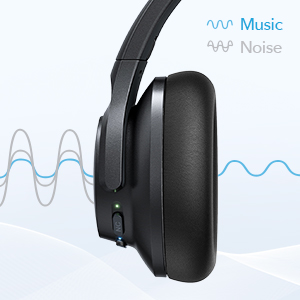
Hybrid Active Noise Cancellation
Life Q20+ active noise cancelling headphones are engineered with internal and external microphones to cancel out an extended range of low and mid-frequency noises such as airplane engines and traffic.
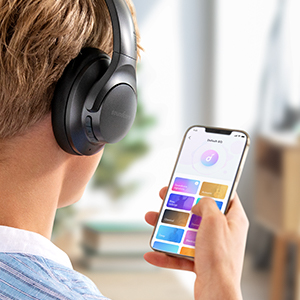
soundcore App
Choose from 22 preset EQ modes or customize your own, switch between noise cancelling, normal, and transparency modes, and upgrade Life Q20+'s firmware easily.
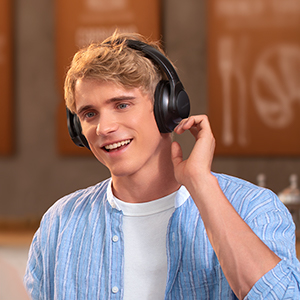
Clear Calls
Life Q20+ has a built-in microphone so you can easily make calls while using headphones.
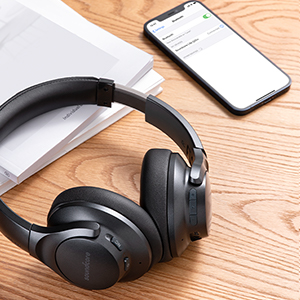
Bluetooth 5.0
Get an ultra-fast and virtually unbreakable connection between Life Q20+ and your mobile device. Compatible with smartphones, tablets, laptop computers, and more.
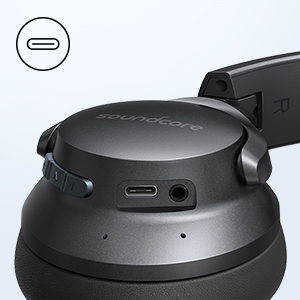
USB-C Charging
Life Q20+ active noise cancelling headphones use USB-C for fast and convenient recharging.
FAQ
- Playtime with active noise cancelling on: 40 hours at 60% volume.
- A 10-minute charge gives you 3 hours of listening.
2. Reset Life Q20+.
3. Try pairing Life Q20+ with another device.
- Turn off Bluetooth on the device you were connected to so that Life Q20+ enters pairing mode. Then connect to a different device via Bluetooth.
- If you prefer not to turn off Bluetooth on the first device, press the power button twice to make Life Q20+ re-enter pairing mode, and find Q20+ in the second device's list of available Bluetooth devices.
- Reset your Bluetooth connection by turning off your device's Bluetooth for at least 10 seconds, then turn it back on.
- Reset Life Q20+ by long pressing the power button and volume up button for 5 seconds.
- Try connecting to another device to see if there is any difference.
- Try connecting to another device to see if there is any difference.
- Forget Life Q20+ in your device's Bluetooth history and reset the headphones by long pressing the power button and volume up button for 5 seconds, then pair again to test.
- Try connecting Life Q20+ with another Bluetooth device to see if the problem persists.
2) Pair Life Q20+ with your Bluetooth device.
3) Open the soundcore app, click on the headphone icon on the main page, choose Life Series," and "Life Q20+".
- Press the NC button to switch between modes.
Note: Life Q20+ will not automatically enter Transparency mode after turning on.
2. Charge Life Q20+ after using them. In order to improve the battery’s lifespan, do not wait until there's 20% or less power remaining to charge.
3. If Life Q20+ comes into contact with liquid, use a hairdryer on the 'cool' setting to dry them.
4. Clean the headband and earcups with a cotton cloth.
5. Avoid irreversible damage to the headphone caused by excessive external forces.
Note:
- If the microphone is set as "Hands-Free" and the speaker is set as "Stereo," you will hear the person on the other end, but they cannot hear you.
- If the microphone is set as "Consistent with the System" and speaker is set as "Stereo," the computer's microphone will pick up your voice instead of Life Q20+.
- When making calls, "Hands-Free" mode should be selected. For music listening, "Stereo" mode should be used.
- Playtime with active noise cancelling on: 40 hours at 60% volume.
- A 10-minute charge gives you 3 hours of listening.


